


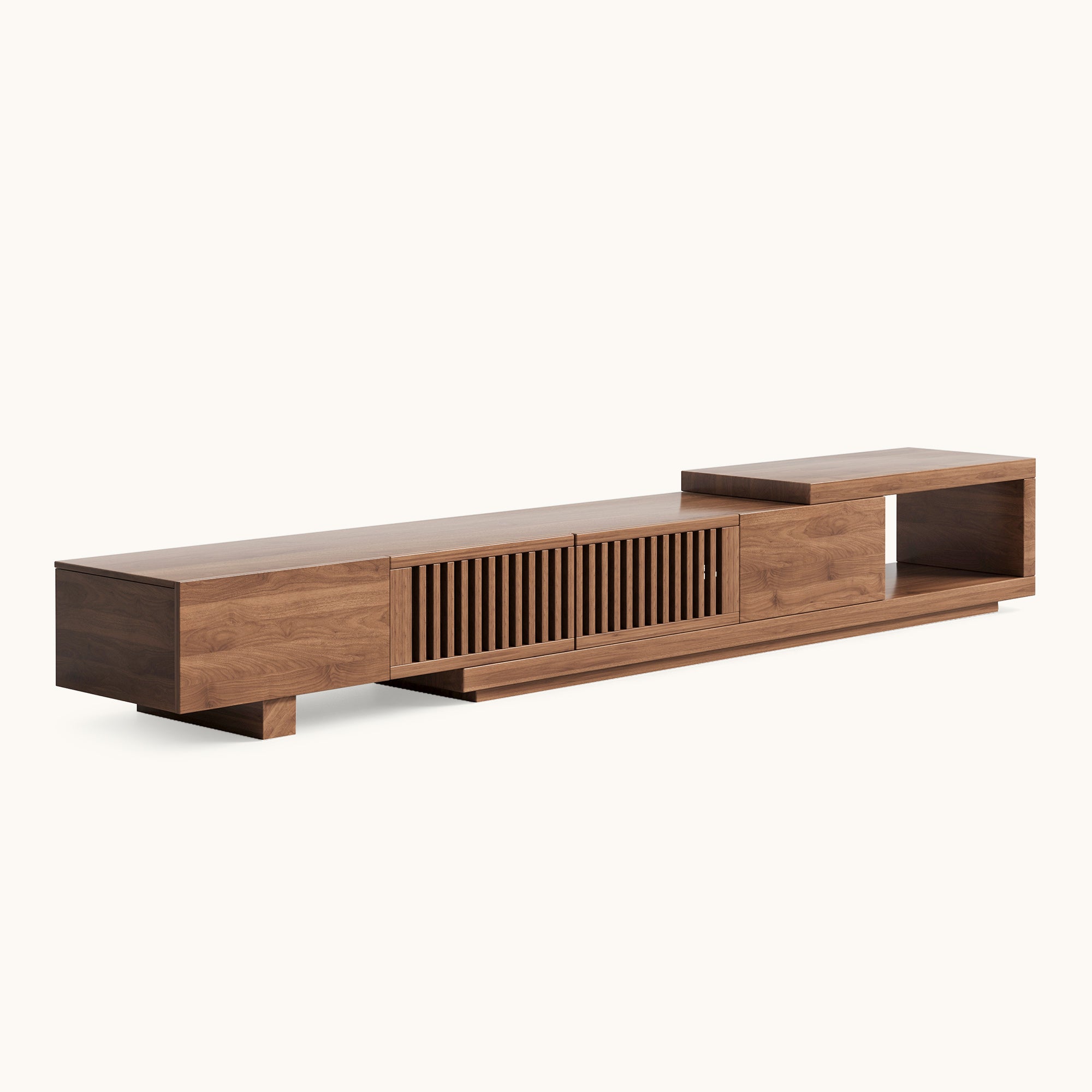


You finally bought the TV stand. It looked calm and intentional in the photos. Then the router moved in, the console came out of the box, the soundbar found a home on top, and four remotes appeared out of nowhere. Within a week, the clean silhouette you paid for is gone — replaced by a knot of HDMI cables, a power strip glowing on the floor, and a controller that always seems to be missing.
TV stand storage is not really about buying more furniture. It is about deciding, before anything gets plugged in, which devices belong behind a door, which belong in a drawer, and which should never be boxed up at all. Get that division right, and the cables mostly take care of themselves.
This guide walks through that division using a simple device inventory, a doors-versus-drawers comparison, and the two technical details most North American buyers overlook until it is too late: heat and infrared signals. If you are still narrowing down the furniture itself, browse the full Famidear TV stand collection with this storage plan open beside you.
Start with a device inventory, not a furniture wishlist
The most common TV stand mistake is shopping by width and finish, then discovering that the drawer depth cannot hold a controller or that the cabinet bay is two inches too shallow for a receiver. Before you compare a single model, walk your living room and list every item that will live in or around the stand: the console, the streaming box, the router, the soundbar, the AV receiver if you have one, the controllers, the remotes, the charging cables, the spare batteries, the game cases.
Then sort each item by two questions: Does it produce heat? and Do I touch it daily?
A practical split looks like this:
| Device | Best storage | Why |
|---|---|---|
| Game console (PS5 / Xbox / Switch dock) | Ventilated cabinet behind doors | Runs hot; needs air volume around it |
| AV receiver / amplifier | Full cabinet bay behind doors | Largest and hottest box; needs depth and clearance |
| Soundbar | On top of the stand | Drivers need open air; do not box it in |
| Router / modem | Ventilated cabinet or open bay | Runs warm 24/7; sealed drawers are a bad fit |
| Streaming stick / cable box | Drawer or behind a door | Small, cool, easy to lose |
| Remotes | Shallow drawer | One home ends the daily hunt |
| Controllers / headsets | Drawer with dividers | Grab-and-go items that tangle if loose |
| Game cases / Blu-rays | Drawer | Small and uniform; drawers keep them filed |
| Power strip / power bricks | Closed cabinet compartment | Bulky and ugly; needs to stay plugged in but out of sight |
The pattern is consistent: heat producers want cabinet volume; cool, frequently handled accessories want drawers. A console-heavy household should weight the purchase toward doors. A remote-and-controller-heavy household should weight it toward shallow drawers.
Doors vs. drawers: they are specialists, not rivals
Most TV stand shopping guides frame doors and drawers as a style choice. In practice they do different jobs, and a good stand uses both in the ratio your gear demands.
Doors are the garage. A full cabinet bay swallows a receiver or a vertically standing console with room to spare. It also keeps the power strip, the surge protector, and the excess six-foot cables out of sight while remaining reachable — open both doors and every plug is accessible. The trade-offs: hinged doors swing through an arc, often 12 to 18 inches per door, so you need clear floor space in front of the cabinet. Cable routing behind doors is also easier to manage than behind drawer slides, where cables can get pinched.
Drawers are the toolbox. One pull and everything is visible: remotes, batteries, controllers, charging cables, spare HDMI leads. Drawers close flush, hide small clutter completely, and take up zero floor space when opened. The number that matters is interior depth, not the stand’s exterior depth. Four to five inches of usable drawer depth handles remotes and loose batteries; five to six inches fits controllers standing upright and stacked game cases. Below four inches, a drawer becomes a junk tray — fine for remotes, useless for anything else.
If your inventory is console-heavy, reserve a full cabinet bay for the receiver or console first. If it is remote-and-controller-heavy, prioritize a stand with at least one shallow-to-mid drawer. A mid-century piece like the Famidear Mid-Century Modern TV-T05 is a useful reference point for this balance: the cabinet zone gives heat-producing gear room to breathe, while the closed storage keeps the daily small items from colonizing the top surface.
The cable plan: route, group, and stop at the wall
Cable clutter looks like chaos because cables are doing three different jobs at once: carrying power, carrying signal, and crossing each other at random. The fix is to separate those jobs.
Run only what must leave the stand. Put the power strip and power bricks inside a closed cabinet compartment, then run only what needs to go up to the TV — usually one power cable and one HDMI — through the rear openings. Everything else stays inside. This single habit eliminates most of the visible "spaghetti" behind an entertainment center.
Group by device, then shorten. Coil each device’s excess cable and secure it with a soft hook-and-loop tie, not a zip tie. Zip ties are permanent and require cutting near expensive wood finishes; hook-and-loop wraps let you swap a cable without scratching anything. Run the bundled cables together down the back leg or back panel, and label each cord before it disappears behind the stand. Masking tape with the device name is enough.
Respect the renters’ constraint. If you cannot drill through a wall or cabinet back, paintable cord raceways and adhesive clips handle light routing. Avoid permanent wall channels unless the lease allows it. The goal is not to hide every inch of cable — it is to make every cable safe, reachable, and visually quiet.
A floating or wall-mounted stand changes the cable math. You get a cleaner floor line, but the route to the outlet becomes more visible unless the unit has pre-drilled routing holes and enough depth to park a power strip inside the cabinet. The Famidear Floating TV Cabinet T11 is built around that constraint: wall-mounted footprint, but still a closed compartment for the power strip and streaming hardware.
Remotes, controllers, and the IR problem nobody warns you about
Remotes disappear because they do not have a home. Controllers multiply because every console ships with one and they all look slightly different. The organizing rule is blunt: one shallow drawer or tray for daily controls, and nothing else goes in it. If the sofa is far from the stand, a small tray on the coffee table may actually work better than storage inside the furniture — the right spot is the one people will use without thinking.
The bigger technical trap is infrared. Solid wood doors block IR signals. A cable box behind a closed solid door will ignore the remote. You have three fixes, from cheapest to most complete: move the receiver if it has an external IR sensor input; add an IR repeater kit, which relays the signal from a small sensor outside the cabinet to emitters stuck inside; or switch to a Bluetooth or RF remote, which passes straight through wood. Game controllers already use Bluetooth, so consoles behind doors never had this problem.
This is why slatted, mesh, cane, and glass-front doors exist on media furniture. They hide the hardware while letting the signal through. If you want solid doors for the cleanest look, budget for an IR repeater — it costs about the price of a pizza and solves the problem completely.
Heat, depth, and the two measurements that decide everything
Closed storage traps warm air. A console or AV receiver in a sealed cabinet without ventilation will run hotter than it should, and over time that shortens the life of the hardware you just spent hundreds on. Ventilation is not a style preference; it is a purchase requirement. Look for back-panel vents, slatted or mesh fronts, or an open bay that keeps the hottest device out of the sealed zone.
The second measurement is depth. Modern AV receivers are deeper than many “slim” media consoles. Check the interior depth of the cabinet bay, not the exterior depth of the stand. If a receiver or center-channel speaker is on your inventory, reserve a full bay and confirm the usable depth before buying. Drawers eat bay space, so every drawer you choose is a bay that cannot hold a large component.
An extendable or wider console helps when the inventory is mixed. The Famidear Mid-Century Modern Extendable TV-T06 gives you the option to widen the storage footprint without changing the room layout, which is useful when one cabinet bay needs to stay dedicated to a receiver while the rest of the gear spreads across drawers and open sections.
A storage setup that survives daily life
The setup that stays organized is the one that matches how you actually watch, play, and relax — not the one that looks best on delivery day.
Keep weekly-use media in the stand. Move everything else — spare discs, old consoles, seasonal accessories — to labeled bins or under-bed storage. Use matching baskets on open shelves to reduce visual noise, but never put a heat-producing device inside a closed basket. Leave the top surface mostly clear: one tray for remotes, one bin or drawer for controllers, one cable-tie system behind the stand, one shelf or bin for games.
A weekly five-minute reset keeps it from rebuilding: return remotes and controllers to their home, remove cups and non-TV clutter, check that cords are still routed behind the stand, and put games back in their assigned bin. The TV stand should not become the living room’s catchall.
Walnut and vintage silhouettes work well for this because the storage is built into the furniture rather than added on. The Famidear Mid-Century Walnut Finish TV Stand T16 and the Famidear Gael Vintage TV Stand T30 both treat closed storage as part of the design language, which makes it easier to keep the cable plan invisible. If you prefer a simpler, lower-profile footprint, the Famidear Mid-Century TV Stand T01 follows the same logic in a more compact frame.
For more room-by-room context, the TV stand collection is organized by storage type, and these related guides cover the adjacent decisions:
- How to Choose the Perfect TV Stand for Your Living Room — a deeper comparison of bay volume, drawer depth, and door swing.
- Best TV Stand Sizes for 75-Inch TVs in 2026 — ensuring your cabinet has the right interior depth and external footprint.
- Mid-Century Modern TV Stands: Materials, Sizes, and Layouts — how wood finishes and door styles impact your overall storage plan.
FAQ
Where should remotes and controllers go in a TV stand?
One shallow drawer or tray dedicated to daily controls, placed close to where people actually sit. Four to five inches of interior drawer depth handles remotes; five to six inches fits controllers standing upright. If the sofa is far from the stand, a coffee-table tray may work better than storage inside the furniture.
Can I put my game console behind a closed cabinet door?
Yes, if the cabinet is ventilated. Consoles run hot and need air volume around them. Choose a doored cabinet with back vents or slatted/mesh fronts, and never seal a console into a drawer or a closed basket. If the cabinet is solid on all sides, add ventilation before the first thermal shutdown, not after.
Will my remote work if the cable box is behind a solid wood door?
Not reliably. Solid wood blocks infrared signals. Use an IR repeater kit, move the receiver so its sensor is exposed, or switch to a Bluetooth/RF remote. Game controllers already use Bluetooth and pass through doors without issue.
Doors or drawers — which is better for hiding cable clutter?
Doors are better for the power strip, surge protector, power bricks, and large components; drawers are better for remotes, controllers, batteries, and spare cables. A stand with both, proportioned to your device inventory, handles clutter more completely than either alone.
How do I stop cables from tangling behind the TV stand?
Put the power strip inside a closed cabinet compartment, run only the cables that must go up to the TV through the rear openings, group the rest by device, shorten excess length with hook-and-loop ties, and label each cord before it disappears. Separate power cables from signal cables where possible.

